How to manage live content delivery using Veset cloud playout platform
Introduction
Nothing can replace the viewing experience of a quality live streamed event. At the same time, this is also an exciting yet somewhat challenging proposal for broadcasters. It’s a great way to increase target audience’s interest and drive new revenue streams, however it is not trivial to do this from a technical point of view.
We, at Veset, understand this problem and are continually working on improving the live streaming capabilities of our Veset Nimbus cloud playout platform. This is why in 2020 we added extended support for multiple live feed inputs on our playouts.
Back to live events: this article explains the live stream management functionality available in Veset Nimbus cloud playout platform (our flagship product). Nimbus is a product for professional live event broadcasting, for both traditional linear television and OTT (Over-The-Top) channels.
Technical overview
Veset Nimbus platform overview.
Live functionality summary: Live signal feeds are directly received on redundant (1+1) playouts (e.g. AWS EC2 machines) over a range of natively supported IP transport protocols:
- SRT;
- HLS and ABR HLS;
- MPEG-TS over RTP-FEC (2-D);
- RTMP (server PUSH, client PULL);
- AWS MediaConnect (Zixi, RIST and other protocols), set up automatically by Nimbus.
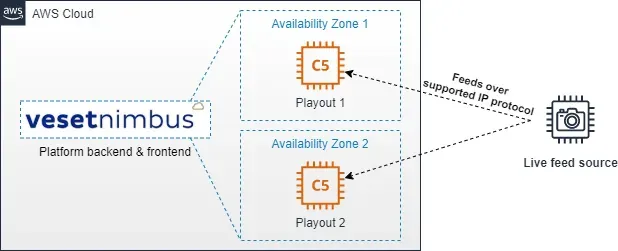
Your choice of protocol depends on the location of the live feed signal source (internal AWS network, external source etc). There are separate tolerances as regards to reliability / packet loss for each protocol.
There is no licence limit on the number of simultaneous live input feeds per playout. The practical number depends on the AWS EC2 instance size used; instances can also be upscaled anytime to accommodate any additional feed requirements.
Switching to the appropriate live signal source on channels/playouts can be managed by either
- following scheduled playlist events (playlist-driven events); or
- manual operator switch to/from the chosen live signal feed.
Usage scenarios
There are multiple usage scenarios for live streaming events with Veset Nimbus.
The first one is a scenario where the live feed is sourced from a resource that is already located inside the same AWS network:
- There is a live feed whose source is, for example, AWS Elemental encoder or AWS MediaLive in the same VPC or AWS region.
- The live feed is the only live feed signal used (not multiple live feeds).
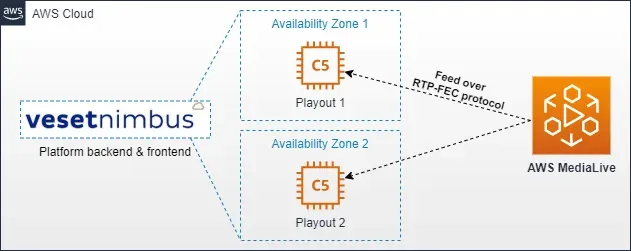
Veset Nimbus configuration for this usage scenario is relatively simple:
- Add a new live input to each playout where you want this live feed to be available;
- Choose a UDP port you would like to use, select RTP FEC protocol. Then push the live feed using the RTP-FEC protocol to the playout’s DNS name or IP address as shown in the Veset Nimbus UI.
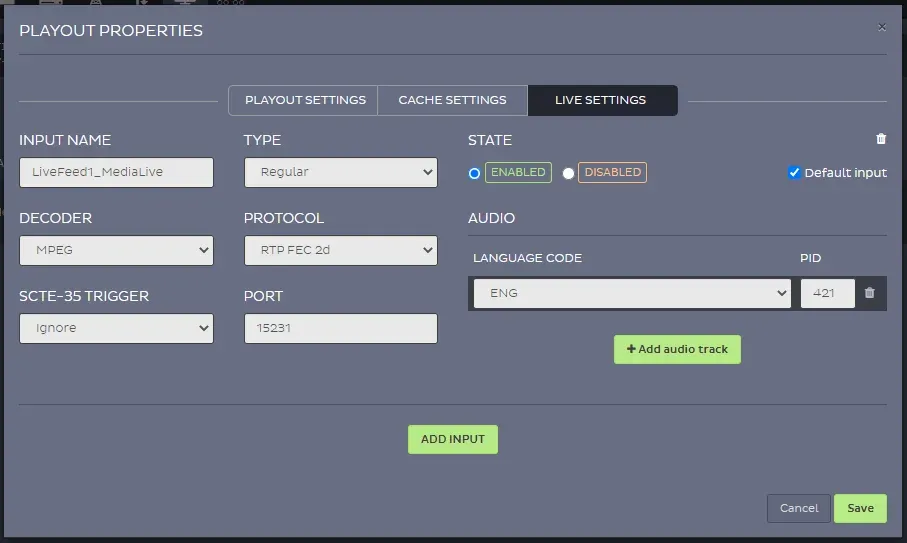
In the next usage scenario, we can look at live feed signals delivered to Veset Nimbus playouts over AWS MediaConnect:
- Live signal might be sourced outside of AWS internal network so a highly resilient transport solution needs to be used; in this case we’re using Zixi protocol.
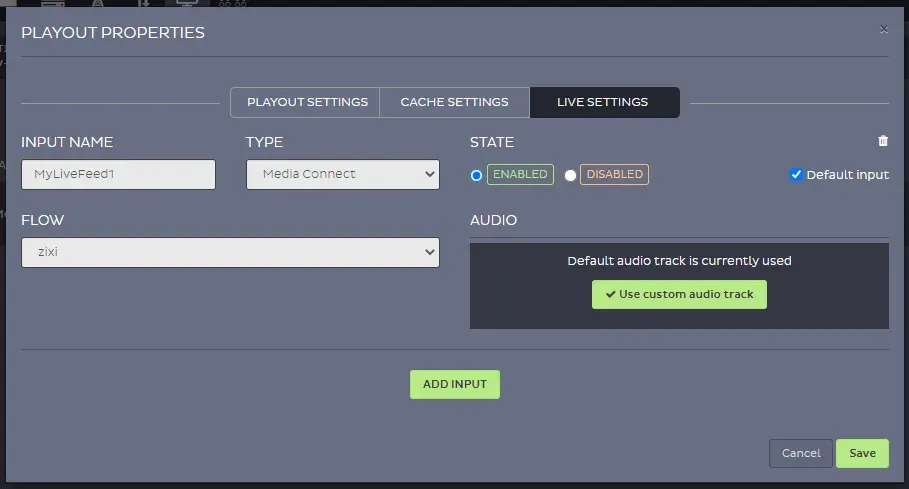
- Feeds are first delivered to an AWS MediaConnect flow. Then, Veset Nimbus automatically creates flow outputs to its playout(s).
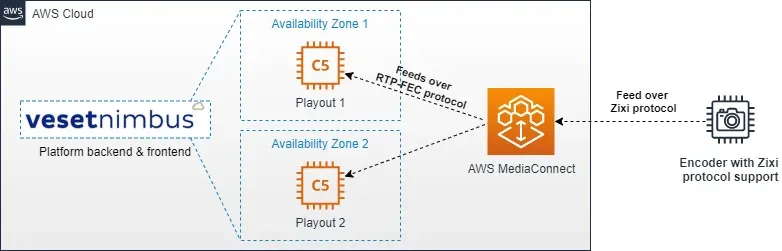
Veset Nimbus live input configuration is automated if you use the same AWS account for both AWS MediaConnect service and Veset Nimbus:
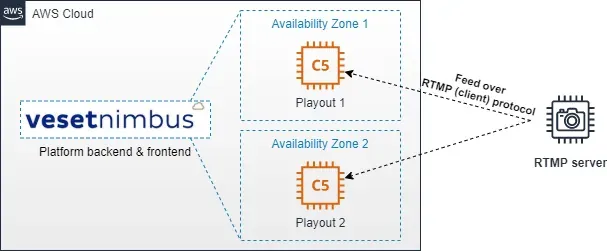
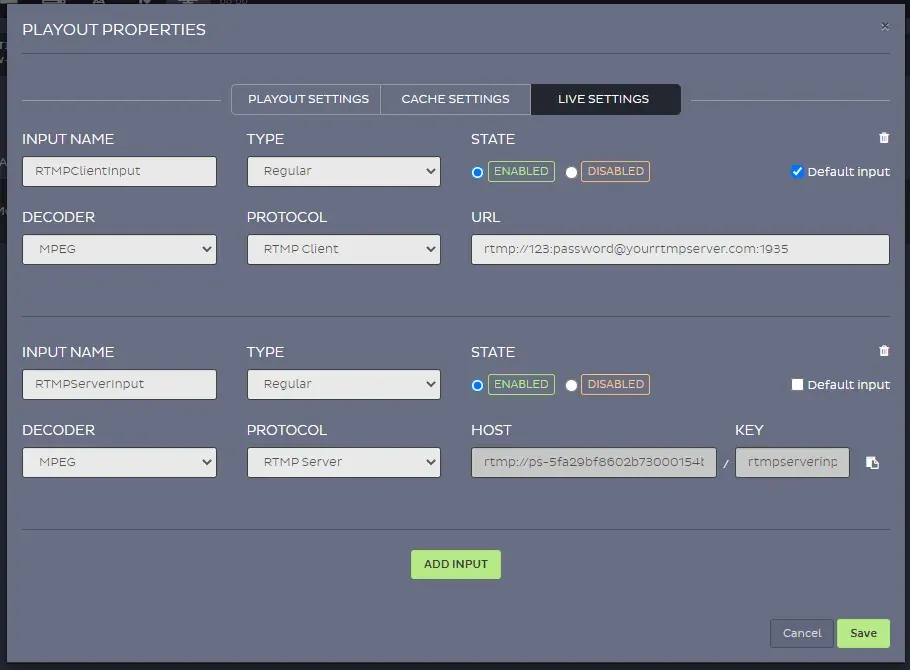
There is also a separate usage scenario for RTMP feeds. Although this is not as reliable as other reliability-focused transport protocols (Zixi, RIST, SRT etc.) it is still widely used for live feed delivery & transport. For RTMP live signal feeds you would be directly pushing them to the playout (RTMP PUSH/server type). Alternatively you can pull the live signal feeds (RTMP PULL/client type) from an RTMP server.
Veset Nimbus configuration example for both live signal feed input types:
Latency
Latency is always a concern when running live streaming events. In the case of a cloud-based playout, there is and always will be additional signal latency when compared to fully SDI workflows. This is due to the nature of this type of playout infrastructure. Veset Nimbus is no exception to this rule.
To summarize, the latency between a live event source and delivery to a head-end location can be split into the following parts:
- Latency of live feed signal transport to cloud (uplink to the cloud): the exact latency is usually measurable and can be managed with the use of low-latency IP signal transport technologies like Zixi or RIST. A good rule-of-thumb average here would be 2-4s.
- Latency of the playout itself: the signal needs to be decoded, then encoded again. Typical latency from live input to output in Veset Nimbus is about 2-5 seconds with SRT in and SRT or TS out. HLS outputs add the segment duration multiplied by the segment count.
- Latency of playout output reaching head-end location (downlink from the cloud): similarly to uplink, this depends on the IP protocol chosen, but the same numbers of 2-4s apply here, also.
So, in comparison to traditional SDI-based workflows, the live latency added is the sum of these parts, typically several seconds. This makes cloud playout a good fit for most live channel workflows, but not for low-latency live sports. Latency can be reduced further in some setups. For example, if the live source already originated in AWS cloud’s network, there’s an even lower latency IP protocol used (AWS DirectConnect to head-end network; transport over RTP-FEC in this case with <1s buffer etc.). But these wouldn’t be your typical deployment scenarios for a typical cloud playout live streaming use case.
FAQ
Q: What live feed input signal types and characteristics does Veset Nimbus support?
A: MPEG-TS feeds over IP with video codecs including MPEG-2, H.264/AVC and HEVC/H.265, in resolutions from SD up to 4K UHD at up to 60 fps.
Q: What AWS services can you receive live feeds from?
A: Any AWS service or encoder that outputs a supported protocol, for example AWS MediaConnect, AWS MediaLive and AWS Elemental encoders.
Q: Can we run manual live events with operator interaction?
A: Yes. Examples include a) live events with undefined end (= live event continues playing out even if its scheduled time has passed; operator switches live event off when it’s finished); b) completely manual operator overrides for manual start/end live events (even unscheduled). Operators can take a chosen event or skip the current one from the console, the REST API or MCP.
Q: Live feeds and SCTE-35: can you…?
A: Yes. SCTE-35 markers can be inserted from the schedule or the API on TS-based outputs, including as secondary events fired over a live source at an offset from the start or end of the live event. Ad insertion itself happens downstream, using the markers Nimbus provides.
Conclusion
There are multiple live streaming event usage scenarios that Veset Nimbus cloud playout platform can help you realize. These include: multiple live input feeds, switching between feeds, using a combination of different protocols to deliver live feeds to the cloud.
So, whether you want to use the product for occasional scheduled live events, or for predominantly live event(s) based channel workflows, Veset Nimbus can support it.